Ads 468x60px


nav bar

Adsence


Friday, 26 July 2013

Top 5 Smartphones Of 2013


Shopping for the Smartphone is difficult for many people because people confuse which device to buy no matter what the price is as they given the various range of devices and options. Here come with some top 3 Powerful smartphones. These smartphones are not rank on prizes, but rank on specific feature.
This list is based on the rankings of Phone received from expert reviews, as well as my own thoughts about these phones.


1).Samsung Galaxy S4

With the launch of Samsung galaxy S4, it kicks all the Smartphone and rank 1st among all Smartphone’s in our list.
Samsung Galaxy S4 was surrounded with tons of feature as compare to other phones. The Samsung Galaxy S4 comes with a sleek and sexy design makes this phone a very good looking in market as compare to other phones in. The 5-inch of multi-touch super AMOLED HD screen with scratch-resistant technology with 1920 x 1080 pixels resolution. With an Android 4.2.2 Jelly Bean operating system completes this smartphone with a powerful 1.6GHz quad core processor integrated with 2GB of RAM with 16GB internal memory space and can be expandable up to 64GB. Samsung galaxy S4 comes with 4G connectivity, and also have 13MP primary camera auto focus feature with flash zero shutter lag & with full HD recording at 30fps with zero shutter lag, and last 2MP front camera for video chatting and all. All these feature makes this Smartphone ranks at 1st position among all & if you are planning to buy it then it’s a good idea but little expensive.
Prize:

The Samsung Galaxy S4 prized in market starts at 707.3$ = 41,749 INR


2) Apple iPhone 5

The Latest generation smartphone by the apple is the iPhone 5. It rank 2nd position in our list, As it comes with 4.0-inch touchscreen with 1135 x 640 resolution with 361 ppi pixels density. It is the first iPhone which supports 4g LTE technology. It’s based on powerfull A6 processor. Its have 8Mp Primary camera with slinky look.

iPhone 5 is litte expensive in india a compare to other. Avg Current Market Price: $1011.11 approx Rs 45500.


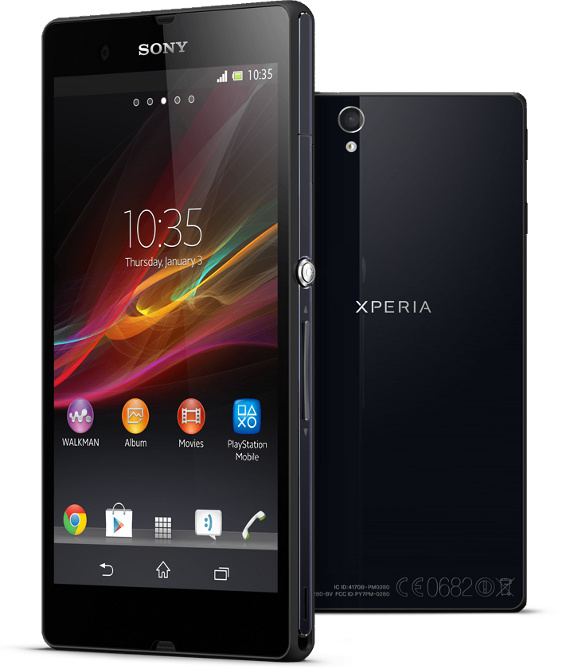
3).Sony Xperia Z

Sony Xperia Z is powerful new generation Smartphone with water & dust resistance proof. It’s rank 3rd in our list because of its powerful feature. The new generation Sony Xperia Z in based on 1.5Ghz Krait Quad Processor with 5 Inch 1080p display & 2Gb of ram with 13MP rare camera with LED flash & 16GB internal Storage with water & dust resistant & runs on Android 4.1.2.


Prize Of this special phone is $844 which is equals to Rs. 37990.


4). Samsung Galaxy Note II
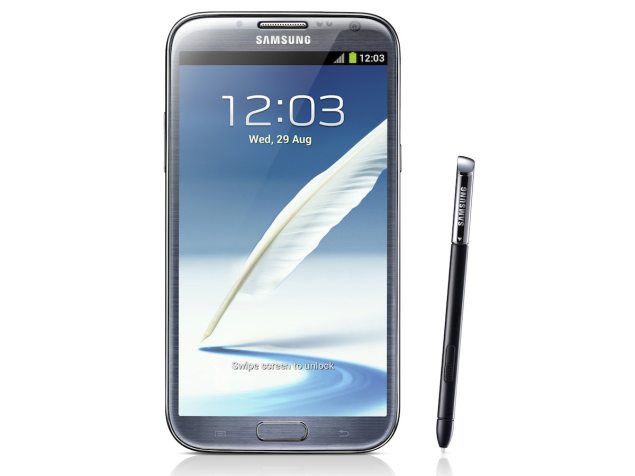
Samsung Galaxy Note II is cool Smartphone. It ranks 4th in our list. It’s based on Quad Core Exynos Processor with Android 4.1 & 2GB ram with 5.5Inch super AMOLED HD Display. With a upgraded version of Bluetooth 4.0 and 16GB On-Board Storage. Samsung Galaxy Note II comes with New S pen which make this smartphone complete.  

The Prize of this Smartphone is $804.44 which equals to Rs.36200


5). HTC One X

The HTC One X is a New flagship Android smartphone, comes with 4.7 inch Super LCD HD display as well as 1.5 GHz Nvidia Tegra 3 Quad-Core processor with 1 GB of RAM. It has 8 megapixel camera with Full HD 1080p video recording feature & 32 GB internal memory with 1800 mAh battery.


The Prize of HTC one X is $722.22 = Rs.32500


Did You Enjoy this Article ?

If yes, Then enter your email below to get
more such great articles in your inbox
For FREE !
Continue Reading...

Saturday, 20 July 2013

Top 10 New Features Of Windows 8

Windows 8 has land up on earth with some awesome new feature which you are loved to listen.  It is released with the all new feature and comes with a new generation in the technology of computer’s operating systems (OS).
Windows 8 is very advance user-interface which is very interesting & user-friendly. It’s added with a new metro UI feature a part of the main windows interface.

Here are some Interesting features of windows 8 which you love to listen:

1). New Metro UI Feature


 Windows 8 comes with a new style of interface a Metro UI. It replaced the start menu from the windows. In metro UI all app arrange in such a order that you can use easily get thus and the good feature is you can arrange it also as your style. The Good feature of Metro UI is the save of time you can save your time with browsing and do a lot more directly in a full screen view.

2).Windows Boot Timing


Windows 8 come with incredible Boot time as compare to older version of windows. Windows maker makes the windows 8 with less to less boot time so that it shows uniqueness in all windows. The boot time make the unique in all computer and windows 8 comes with that uniqueness.

3).New Logon Screen


Windows 8 has a very cool user friendly logon screen with modern style of UI. The logon screen have come up with much better security than ever before and improve the login system user can use gesture as well as pin password for login the windows. This enhances the security of windows 8.

4).Improved In Windows Search


In Windows 8 there is no search box at the bottom in start menu, but comes with a in the metro UI screen. The old version of windows that time to search a particular file or folder, but in windows 8 you can search any file or folder in a second. You can search many thing with the search box.eg- if you are searching for the emails sent by a particular contact, typing that name of it and click on the email app and you go.

5). Windows Store In Windows 8


Like Apple store in apple device, Google play or Google store in android, Windows 8 comes with a new Windows Store feature in Metro UI. Windows Store is a digital distribution platform that built into Windows 8. You can Buy or download many app & Xbox games directly to Windows 8.

6). Multi Monitor Support


Windows 8 also support Multi-monitor support. User can run Windows 8 in multi monitor with different taskbar & different wallpaper in both different screens.
  
7). Extended Protection 


Windows 8 comes with latest version of Windows defender with anti malware support which protects the windows from any upcoming virus or other malware. In Windows 8 Windows defender automatically disable itself when a 3rd party antivirus would install in the windows.

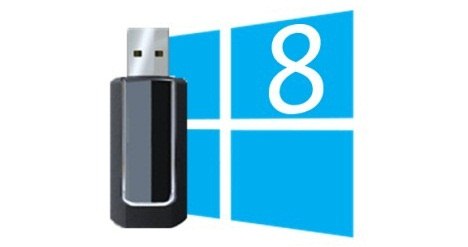
8).Windows To Go Feature


Windows 8 comes with Windows to go feature in this feature user can install the windows 8 in a external pendrive or hard disk & boot it in any other computer or laptop. But Windows To Go only comes with Enterprise version only.

9).Windows Family Safety


Windows 8 integrated with Windows Live Family Safety in the OS. This allow parent to restrict Web Sites, Windows App, computer limit usage. Parent control had introduced in windows vista but removed in windows 7 & introduced as windows live family safety.    

10).Windows Microsoft Account Integrated


User can synchronize user data, Microsoft service that is Xbox live, Xbox music, Xbox gaming and skydrive online file storage.  

Did You Enjoy this Article ?

If yes, Then enter your email below to get
more such great articles in your inbox
For FREE !
Continue Reading...

Wednesday, 17 July 2013

How to make a program which delete temporary files and Speed up your Pc Without Any Software

Temp file are the temporary files that are store in your hard disk, it also slows the computer very much but have you ever tried to delete them. You will find a speed different after deleting them.

But many people don't know what is temp file & how to delete. So this help in speed up your pc.


Deleting temp file a very difficult task for many people, open the run then & temp...all this is long process but making a simple program of this on you widows desktop like a shortcut which help your to cut the long process & you can run regularly and speed your window everyday or you can add it in startup service in which this program automatic launch when you start your windows. I tell you all these steps one by one. No Software required for this only required is a notepad service.


Let Get Started Of Making this programe :-

1) Open Notepad From Start Menu. Start>>All program.>> Accessorize>> Notepad.
2) Copy & paste this code in notpad->


@echo off
del %TEMP%\*.* /f /s /q


{Do Not Change This Code.}


3). Save the notepad file and Enter file name as "delete-temp.bat" & save it on desktop so  you can easily access to it.


4). If you want to add to startup service (that is automatically start with windows) copy this bat file (this saved file) in Startup Folder, which is present in start>>All program>>startup. And Here we go every time you start you pc the window automatically start this and clean the temp file and also speed up your pc without any other software. :-) So have fun.


Continue Reading...

Tuesday, 16 July 2013

Why Storage devices have less space then that they promised?


We all purchase pen drive, hard disk, Etc. But do you seen that the storage.But it happened to us. When buy the dealer or company promise to be exact space but after checking it resulted less, usually got angry for the company for false marketing thinking and the shop from where we brought. But they are not responsible for any mistake whether they are company or dealer. But have you ever thought that how do they again and again in huge amount without getting into illegal promise trouble?

The answer is that they are not marketing illegally. I’ll tell you how this confusing have done. A manufacturer or company of producing goods considers 1 Mb to be 1000 kb and we all also thinks that & 1 Gb to be 1000 Mb, 1 Tb to be 1000 Gb. But as per the computer 1mb = 1024kb, 1 GB = 1024Mb, 1Tb=1024 GB .This difference in the method of computation is responsible for this "missing space."
I don’t know why this all happened. But it’s not mistake & not illegal. Let me explain with a example.

Let us take an example of a 16 GB pen drive disk. 

*From a manufacturer’s and company point of view, the 10 GB will have 10*1000*1000*1000 = 16000000000 bytes.
*But from a computer’s point of view, 10GB is actually 10*1024*1024*1024 = 17179869184 bytes.

So, a pen drive that promises to have 16 GB storage space will actually display 14.9012 GB.


So next time be aware for storage device that are purchasing. ;-)
Continue Reading...

Monday, 15 July 2013

8 Special Google Instant Searches

Google is the first site which have a number of feature that you cannot imagine .Google is very advance and a type of modern site where u can find everything..Every thing. With Google you can cheek time, weather, use calculator, see stocks and many more instantly.

Here are some secretes that Google have in here site

1) Google Show Any Event Or Celebrity Birthday

As you notice that Google show any event or birthday on their home page which aware the people of the recent event and aware student the history where student lean about. By clicking on these events you can learn more about it, just on one click.


2).Google As Calculator


You can calculate any problem with Google calculator i.e type any problem in Google bar and u get instant results.


3).Google Unit Conversion

Use Google for any conversion of any unit to any unit with instance answer. eg - 4 c to f.


4).Google to check Weather

You can check recent weather of any place and any region by just typing name of place and weather.
Get full detail instantly.
eg-New York weather.


5).Google As Currency Converter

You can convert any currency to any to any currency .you can also check the stocks of it. Eg type 50 usd into euro.


6).Google As Time Clock

You can see time of any place any time with Google. Eg Just type time in India or UK, usa,etc


7). Google As Information

You can check anything from Google like Population of India, Movies playing, Flight from India to usa, about Linkin Park, etc.


8). Google As Stock Information

View any Stock information , With full detail of graph and price .By just searching any symbol of any stock.


Continue Reading...

Sunday, 14 July 2013

6 Easy Ways To Speedup Windows Startup

Windows booting is a common in windows , but some of the people have problem with the booting some takes 3 min or someone takes 5-6 min. Windows booting is depend on system if your system have a good performance then the boot also have good. A study show Windows vista that very much time to open window second place windows xp then windows 7 & then windows 8.So Choosing windows 7 & 8 help in startup the window smoothly and fast.


So have I have come up with how to decrease the windows booting time.

1).Maintain Your Bios
Maintaining the bios is not very difficult its basically to arrange the device that gone be start with pc so check and remove the device that u not use like Floppy drive, etc  .It basically means to boot setup from these device but like other floppies are not use any more for installing windows.
When your pc stats it shows the detail of bios menu it basically f2, f10, f12, by pressing these keys you opened with your bios menu.

2).Clean Up the Startup Programs
One of the most effective way is to clean the startup programs that starts with your window.
To do this open run the type ”msconfig ” then press enter and you have opened with system configuration box , in that go to startup tab and uncheck those programs that you don’t want to run at startup of windows ,It naturally increase the speed of widows booting.

3).Change the boot menu time out value
If are using two or more windows then it definitely have the timeout .It basically means how much the menu of windows boot manager delay. So changing the timeout value boast the boot time of windows. To do thin open Msconfig from the run and go to   Boot tab and change timeout value to 10 or 20 it basically your choice. Changing the value speed the startup speed of windows.

4) Disable Unused Hardware
Disabling unused hardware speed the boot time a lot. It’s basically disable the device that take time to start up the windows mean its windows slow the startup in loading these drives .The lesser the driver be the lesser time take to startup. To do this GO to device manager for control panel and see which device you don’t want then press right mouse button and select disable those device that you don’t want. Then restart your pc and u see a much difference in speed.

5). Disable Windows Startup Sound
Window takes time to load the sound in startup .Disabling the startup sound increase the speed of startup. To do this go to sound from control panel and then go to Sounds tab ,Scroll down and disable startup windows sound & logon sound. You can also change and window sound from there.

6).Upgrade your ram
If you have old pc then you must need to upgrade your ram .If u have windows xp then 1gb is good, windows vista 1.5gb or 2gb ,windows 7  2-4 gb & for windows 8 also 2-4 gb .


Continue Reading...

Saturday, 13 July 2013

12 Common Keyboard Shortcuts That Helps !!

Keyboard is a very main & commonly uses device, without the keyboard it’s very difficult to work on computer so it’s very important device.
Shortcuts are mainly use in keyboard, as it increased the time of doing work that’s why it’s called shortcut key. But some people won’t know much shortcut keys which greatly decreases the time.

Some of the commonly used shortcut keys are:

  • Ctrl + C & Ctrl + V

You can copy & paste any text, Para or picture from anywhere to anywhere .Its common and many people knows it.

  • Alt + f4

Close current window that is open currently or if desktop is active than it show shut down window.

  • Ctrl + backspace

Delete current written word or text in sentence or paragraph.

  • Start + L

Go to logon screen of window
  •  Start + R

Open Run windows.

  • Ctrl + Alt + Del

Open task manager or the list of common logon settings.

  • Ctrl + F

Open the find windows, where u can search

  • Alt + tab

Open a list of running windows quickly.

  • Ctrl + S

Save the running document .It’s very useful for those who make important presentations.

  • Ctrl + P

Open the printing windows quickly.

  • Ctrl + Z & Ctrl + Y

Undo any change which is currently happen or if you want to redo anything press Ctrl + Y.

  • Ctrl + Home & Ctrl + end

Take your cursor to beginning or end of a document.


Continue Reading...

ShareThis

Related Posts Plugin for WordPress, Blogger...
 

Follow us on networked Blogs

Total Pageviews

Contact Form

Name

Email *

Message *